Alternatives
A Free Typora Alternative for Windows: Meet MarkPad++
Looking for a free Typora alternative on Windows? Meet MarkPad++: a Markdown editor with live preview, tabs, and offline export to PDF and Word.

Perhaps your Typora trial is coming to an end. You have enjoyed writing in Markdown, collected a few useful notes, and started wondering whether you need to buy an editor for the amount of writing you do.
For a README, a folder of notes, and the occasional longer draft, a free app might be a comfortable fit.
MarkPad++ is a free Markdown editor for Windows that brings editing, reading, and document export into one app. You can open the .md files you already have, make changes, and see the formatted result beside your text or in a full reading view.
It is worth trying if you want a place to work on your Markdown without buying a license.
What you might miss about Typora
Typora's appeal is easy to understand. Its Live Preview lets formatting appear right where you are writing. A heading takes shape on the page, and Markdown symbols step out of the way as you move through the document.
Typora offers a free trial, with a paid license for continued use. That license is a one-time purchase, as explained in its purchase guide.
Side by side, the two look like this:
| Feature | MarkPad++ 1.0.5 | Typora |
|---|---|---|
| Cost | Free | Paid licence, one-time, after a free trial |
| Formatted view | Live preview beside the source (Ctrl+Shift+E), or a full-window reader mode (Ctrl+E) | Inline Live Preview |
| PDF export | Built in | Built in |
Word (.docx) export | Built in; Word is not needed to create the file | The export menu needs a separate Pandoc installation |
OpenDocument (.odt) export | Built in | Through the same Pandoc installation |
| Desktop platforms | Windows only | Windows, macOS, Linux |
MarkPad++ column updated October 11, 2026, for version 1.0.5. Typora entries checked September 16, 2026, against its documentation.
The useful question when considering a free alternative is how you want to spend your writing time. Do you love seeing formatting appear in the very line you are typing? Or are you happy to watch it take shape beside your text, and read the passage back when it is done?
MarkPad++ suits the second rhythm.
Write a little, then read it back
Imagine you are putting together a short guide for a colleague. You write an introduction, add a few steps, and include a table of useful links. In MarkPad++, you edit the Markdown source, with syntax highlighting helping you pick out the formatting.
Then press Ctrl+E.
The document switches to reader mode. You can see how the headings divide the page, whether that list is too long, and how the paragraphs flow. Spot a sentence that needs work? Press Ctrl+E again and change it. MarkPad++ keeps your place as you move between editing and reading.
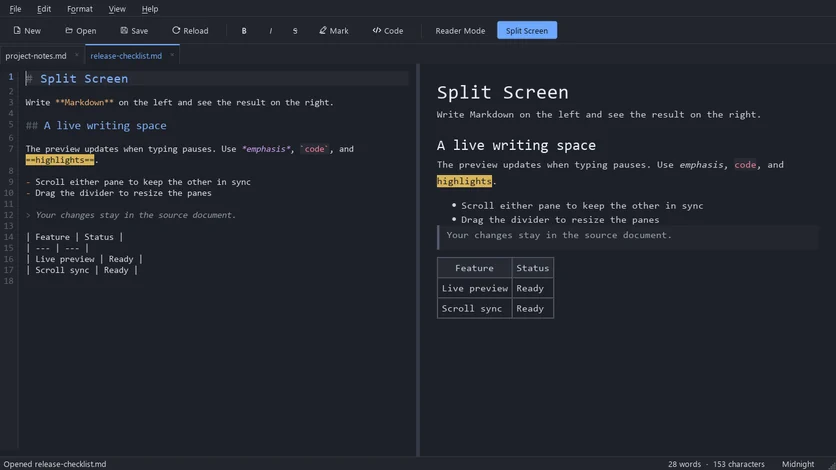
Prefer to see the result while you write? Press Ctrl+Shift+E for Split Screen. The source stays on the left and the formatted page appears on the right, catching up whenever you pause. Scroll either side and the other follows.
That is the honest difference from Typora: MarkPad++ shows the formatted page beside your Markdown, or instead of it, but it does not format the text you are typing in place. If Typora's inline Live Preview is the part you value most, that difference matters.
The everyday details are familiar, too. Each file opens in a tab, so your draft can sit alongside your reference notes. Ctrl+B adds bold formatting, Ctrl+I adds italic, built-in light and dark themes let you choose the appearance you prefer, and Editor Settings (Ctrl+,) let you pick your own font and Markdown colours. And if the app or your PC crashes, unsaved text comes back as a recovery draft the next time you start it.
The useful extra: send a PDF or Word copy
Markdown is convenient while you are writing. The person receiving your work may ask for something else.
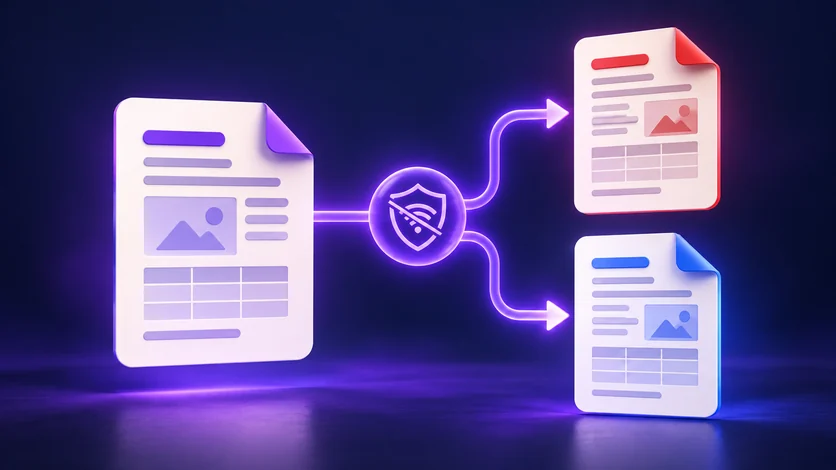
That is where MarkPad++'s built-in export comes in. Choose File > Export to create a PDF, a Word document (.docx), an OpenDocument Text file (.odt), or a standalone web page (.html).
Your guide can become a PDF to read or print. Your draft can become a Word file for someone else to edit. You keep the original Markdown and create a separate copy in the format they need.
The conversion runs offline on your computer, and Word does not need to be installed to generate a DOCX file. With your document and its images available locally, you can finish the job even when you have no internet connection.
For an editor you use mainly for notes and occasional documents, that is a useful amount of work to get done in one place.
Try it with a document you already know
The easiest way to judge an editor is to open something you have written yourself.
- Install MarkPad++ and open an existing
.mdfile with Ctrl+O, or drag it onto the window. - Press Ctrl+E and read a section you know well.
- Switch back, press Ctrl+Shift+E, make a small edit while the preview follows, and save with Ctrl+S.
Your Markdown files can move between editors without a conversion step. Rendering can vary, though: MarkPad++ does not render Mermaid diagrams or LaTeX-style math, so documents that rely on those need a closer look. Footnotes, reference-style links and a [TOC] table of contents are supported since version 1.0.5.
For notes, guides, and drafts built around headings, paragraphs, lists, and tables, you can get a feel for the app in a few minutes.
If you are looking for a free Typora alternative for Windows, give MarkPad++ a try. Open a familiar document, write beside the live preview, read it through, and see whether that rhythm feels right for you.
Try it yourself
MarkPad++ is a free, offline Markdown editor for Windows 10 and 11. A live preview beside your text, no account, no telemetry, and export to PDF, Word and OpenDocument built in.
Written in Markdown, of course — read this article as a .md file.